AI-generated page. This page was automatically generated from a source and a project page and may contain inaccuracies or outdated information. Please verify details with the original source.
Eden Duo
A Nintendo Switch emulator for dual-screen Android handhelds that adds live touch companion screens on the second display.
Description
Eden Duo is a fork of the Eden Nintendo Switch emulator for Android devices with two screens, such as the AYN Thor. The game runs on the top screen as usual, while the bottom screen shows a touch companion for the game you are playing: maps, party and inventory menus, status, and more, all driven by the running game's live state.
Companions are separate, installable .dsmod.zip packages, one per game, so a companion can be updated without updating the emulator. They ship no game assets — all art and text comes from your own game files. Dual-screen support is available for 27 games: Persona 5 Royal, Metroid Dread, Link's Awakening, Mario Kart 8 Deluxe, Super Mario Bros. Wonder, Animal Crossing: New Horizons, Fire Emblem: Three Houses, The Binding of Isaac: Afterbirth+ and Repentance DLC, Pokémon Brilliant Diamond, Pokémon Shining Pearl, Crash Team Racing Nitro-Fueled, Dragon Quest III HD-2D Remake, Chained Echoes, Yoru Tomosu, Diablo III: Eternal Collection, Farming Simulator: Nintendo Switch Edition, VA-11 Hall-A: Cyberpunk Bartender Action, The Legend of Zelda: Breath of the Wild, Castlevania: Belmont's Curse, Super Mario Odyssey, The Legend of Zelda: Echoes of Wisdom, Dave the Diver, Persona 3 Portable, Fire Emblem Engage, Octopath Traveler 0, Pokémon Sword, and Pokémon Shield.
Features
- Second-screen companion — the game on the main screen and a touch companion page on the second display.
- Live game state — companions read the running game's memory every frame: no save-file snapshots and no polling delays.
- Installable packages — add a companion from the game's Add-ons menu with its
.dsmod.zip; packages are validated (title, build, file layout and module checksums) before they are installed. - Native companion modules — a package can carry a small native module for games whose data is too complex for a declarative manifest; modules talk to the emulator through a small, versioned C interface and never ship inside the APK.
- Touch that feels native — taps, press-and-hold gestures, drag and drop, animated page and layout changes, and haptic feedback on the second screen.
- Second screen your way — swap the screens, stretch the companion, or open another app on the second screen for games without a companion.
- Built for handhelds — change-driven partial redraws, tile-based texture uploads and an optional GPU compositor keep the second screen at full frame rate without costing the game frames.
- Every dual-screen game listed — the game list ends with every game that has a companion, so you can see what is supported.
- Hide the companion mid-game — tap the game screen with four fingers (or use the Quick Settings tile) to free the second screen for another app; tap again to bring the companion back.
- Improved import — a clearer "Import from another emulator" flow and a fixed save import from Eden.
- Follows Eden Nightly — upstream fixes and improvements arrive sooner; version 1.3.3 is based on Eden's latest nightly.
Requirements:
- Android 13 or newer (arm64).
- A device with a second display.
- Your own legally obtained game dump with the matching update.
- Your console's keys and firmware.
Supported games
- Persona 5 Royal (1.0.2) — the full start menu on the bottom screen: skills, items, equipment, Persona, stats, confidants, requests and the calendar with the Daily Log. You can use items and change equipment or Persona by tapping, and see enemy affinities in battle.
- Metroid Dread (2.1.0) — a live area map with Samus's position, EMMI zones, water levels, and energy and missiles.
- The Legend of Zelda: Link's Awakening (1.0.1) — a live map with your own pins, plus gear and items, with X/Y equip from the touch screen. Watch a video showcase.
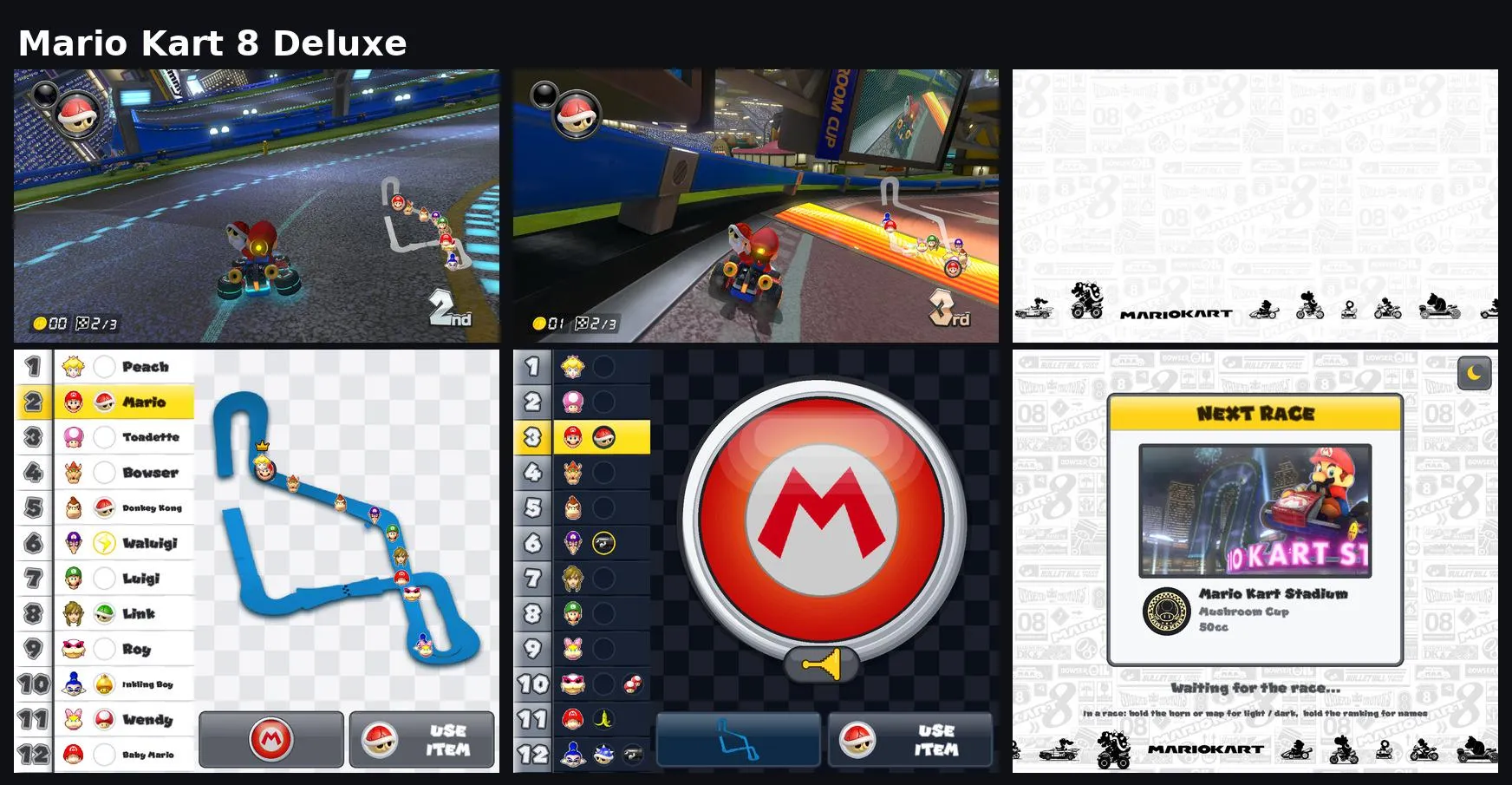
- Mario Kart 8 Deluxe (4.0.1, 4.0.0, 3.0.3) — a live rank bar with every racer's items, a course map showing all racers, and a big horn button. Also works with CTGP-DX v1.1.1 custom tracks.
- Super Mario Bros. Wonder (1.2.1) — a course page with a progress rail from start to goal, your 10-flower coins, world Wonder Seeds, current form and item balloon, and a world map page with the selected course and an Open Courses button.
- Animal Crossing: New Horizons (3.0.3)
- Fire Emblem: Three Houses (1.2.0) — combat information, maps, academy information and more on the second screen. Watch a video showcase.
- The Binding of Isaac: Afterbirth+ and Repentance DLC (1.7.9b)
- Pokémon Brilliant Diamond / Shining Pearl (1.3.0) — a field map, party, bag, Pokédex, Pokétch and battle controls. Two packages, one for Brilliant Diamond and one for Shining Pearl; each works with vanilla or Luminescent Platinum 2.2F.
- Crash Team Racing Nitro-Fueled (1.0.15) — live standings with portraits, racer positions on the course map, lap and race clock, and options to hide the native HUD.
- Dragon Quest III HD-2D Remake (1.1.0.0) — field map, party status and gear, bag, journal, Heal All and battle info, including possible enemy spells.
- Chained Echoes (1.41) — area map and objectives, battle turn strip and Overdrive, skills, crystals and formation.
- Yoru Tomosu (1.0.0)
- Diablo III: Eternal Collection (2.7.7, 2.7.6)
- Farming Simulator: Nintendo Switch Edition (1.5.0.1)
- VA-11 Hall-A: Cyberpunk Bartender Action (1.0.0)
- The Legend of Zelda: Breath of the Wild (1.6.0) — the Sheikah Slate on the second screen: a live map with your pins and quest markers, secondary weapon, inventory with instant equip, sort and eat, Champion abilities, and the Travel Medallion.
- Castlevania: Belmont's Curse (1.1.0) — the pause-menu map always open with fog and landmarks, pins placed straight from the touch screen, and the equipment screen with arcana, weapons, relics and stats.
- Super Mario Odyssey (1.4.1)
- The Legend of Zelda: Echoes of Wisdom (1.1.0)
- Dave the Diver (1.0.6.1267) — companion contributed by a community member.
- Persona 3 Portable (1.0.0) — companion for the base game, contributed by a community member.
- Fire Emblem Engage (2.0.0) — the War map with the danger zone on the second screen, unit details, Engage and Emblem bonds, the attack Matchup forecast, a live Somniel map with everyone's location, Units, Roster and the World Map.
- Octopath Traveler 0 (1.0.5) — a live map, party status and equipment, items and quests, and a battle screen with BP forecast, shields, Break and revealed weaknesses.
- Pokémon Sword (1.3.2) — Town Map with wild Pokémon and Fly, party (drag to reorder), Pokédex, Bag (use items right from the bottom screen), League Card, and touch battles with type matchups and Max Raids. Includes Isle of Armor and Crown Tundra; runs in multiple languages.
- Pokémon Shield (1.3.2) — Town Map with wild Pokémon and Fly, party (drag to reorder), Pokédex, Bag (use items right from the bottom screen), League Card, and touch battles with type matchups and Max Raids. Includes Isle of Armor and Crown Tundra; runs in multiple languages.
Compatibility is intentionally strict: each companion is written for one exact game build and checks the running build before it loads. On any other version it does not load and shows a notice, instead of reading memory it does not understand.
Details, screenshots and downloads for each companion: Eden Duo Companions.
Setup guide
- Download the latest EdenDuo APK (1.3.3 or newer) from the Releases page and install it.
- Set up the emulator as usual: keys, firmware, and your games folder.
- Download a companion package from the Eden Duo Companions repository.
- In Eden Duo, long-press the game, open Add-ons and tap Install. In the Content type dialog choose Dual screen mods, tap OK, then select the
.dsmod.zipfile. The companion appears in the Add-ons list asName-version, for exampleMetroidDreadDS-1.0.0. - Launch the game — the companion appears on the second screen once the game reaches gameplay.
Each companion needs an exact game version, listed in the companion repository. Eden Duo uses its own app ID, so it installs alongside other Eden builds and keeps separate data.
Second-screen options are in Settings → Graphics → Second Screen, and each game can have its own values (long-press the game, then Settings → Graphics → Second Screen). You can swap which display runs the game, stretch the companion, or choose what the second screen shows for games without a companion — including launching another installed app on it.
Eden Duo can also be launched from frontends: CocoonFE has built-in support (open Settings → Library & Data → Refetch Platforms, then set Player Override to Eden Duo for each game), and ES-DE (Android) works by copying the provided es_systems.xml and es_find_rules.xml into ES-DE/custom_systems/ and restarting.