July 27, 2026·
OpenMW-DS
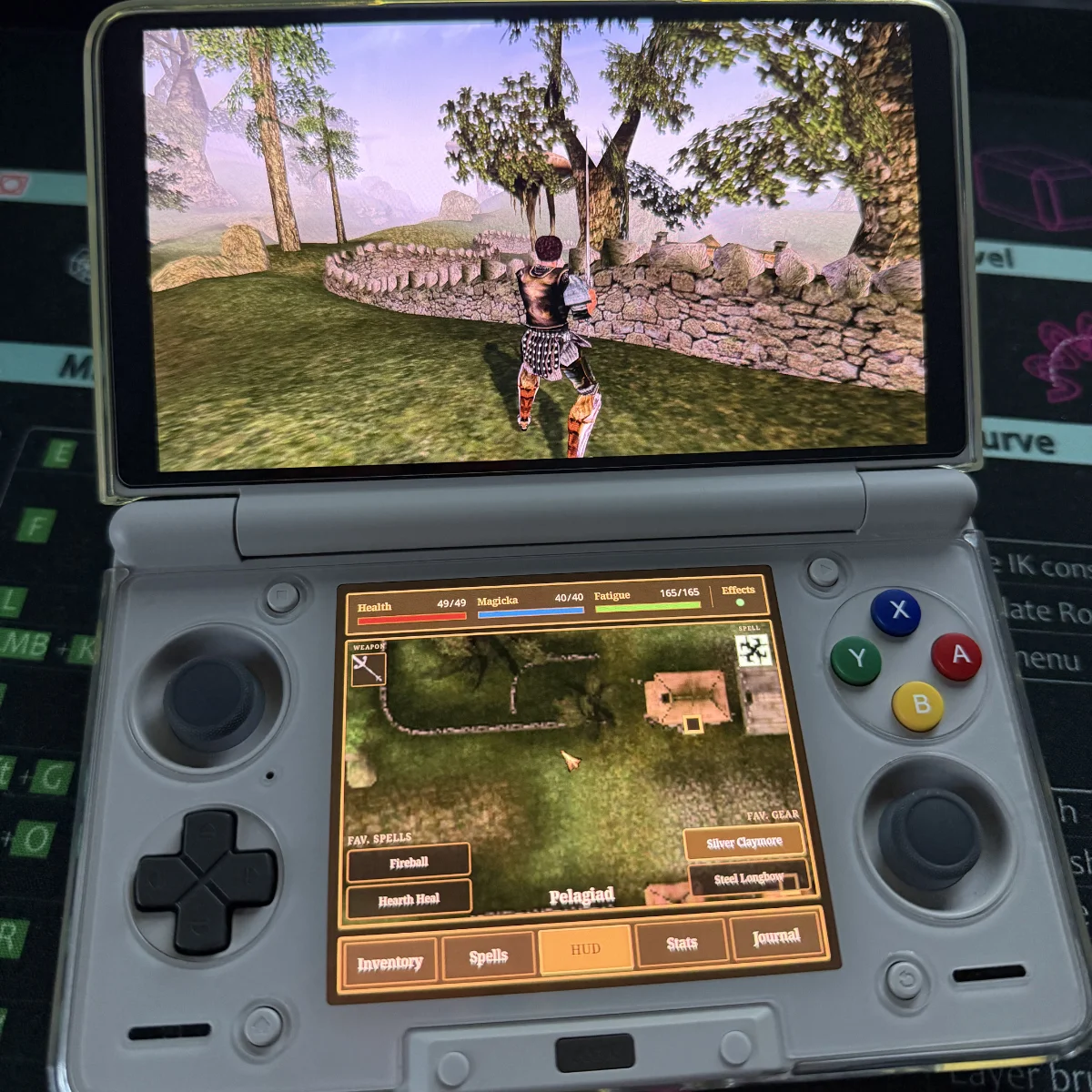
A second-screen for OpenMW on the AYN Thor handheld. The game plays on the top screen while the bottom screen shows live stats, inventory, magic, journal, and a minimap.
Features
- Minimap: a live, player-centered, rotating map of the current cell, rendered by the engine itself and streamed to the second screen (uses the same system as the vanilla in game minimap would).
- Live character stats: health, magicka, fatigue, & active effects, updated continuously.
- Favourite items & spells: Added little buttons on the minimap that can be used to store favourites for faster swapping of weapons or spells.
- Inventory: full list of inventory with tap to equip/unequip, long press for info, drop, add to favourites.
- Magic: spells, powers, and scrolls with tap to equip/unequip, long press for info or add to favourites.
- Journal: Lower screen version of the in game journal (with all functionality: quests, topics, etc).
- Optional UI Overhaul: an overhaul of the in game UI to make it look more like the companion UI on the bottom screen. Completely optional and can be turned off in the options menu (on pause). This is just to help with the stark contrast between vanilla resolution and OpenMW-DS lower screen resolution.
- Optional Touch Contols: Alpha3 uses the left thumbstick as a mouse for menus. This version allows the use of touch input instead (Activated at the bottom of the OpenMW-DS Options page).
Setup guide
Link to project: github.com