AI-generated page. This page was automatically generated from a source and a project page and may contain inaccuracies or outdated information. Please verify details with the original source.
PadPort
Play RPG Maker games on Android with gamepad support, touch controls, and game-specific dual-screen features.
Description
PadPort is an Android app for playing RPG Maker games with a controller. It runs RPG Maker MV and MZ games straight from their original PC folder, and also plays XP, VX and VX Ace games (experimental). No converting and no PC needed — PadPort never changes your game files. It supports Bluetooth and USB controllers, the built-in controls of handhelds like the AYN Thor, an optional on-screen controller for touch screens, and experimental second-screen panels for supported games.
Setup guide
Download the APK from the Releases page and install it — Android will ask you to allow installing apps from this source. Copy the whole game folder from your PC to the device (unpack it first if it is in a ZIP). Open PadPort, tap Add game folder, pick the game folder (the one with index.html, or the one that contains www) and allow access when asked. Then tap Play. When a game gets an update on PC, copy the new files over and use Refresh files after a game update in the game's ⋮ menu.
Features
PadPort plays RPG Maker MV and MZ games from their original PC folder, plus XP, VX and VX Ace games (experimental). It works with Bluetooth and USB controllers and with the built-in controls of handhelds like the AYN Thor, and offers an optional on-screen controller for touch screens. There is button mapping and a controller tester, a keyboard mode for games that only listen to the keyboard, a game library with artwork from the game, Steam or your own pictures, and save backups that let you export and import saves. MV / MZ games can run on two browser engines: GeckoView (the 64-bit Firefox engine built into PadPort, default) or the Android System WebView. The app is available in English and Polish.
Two screens
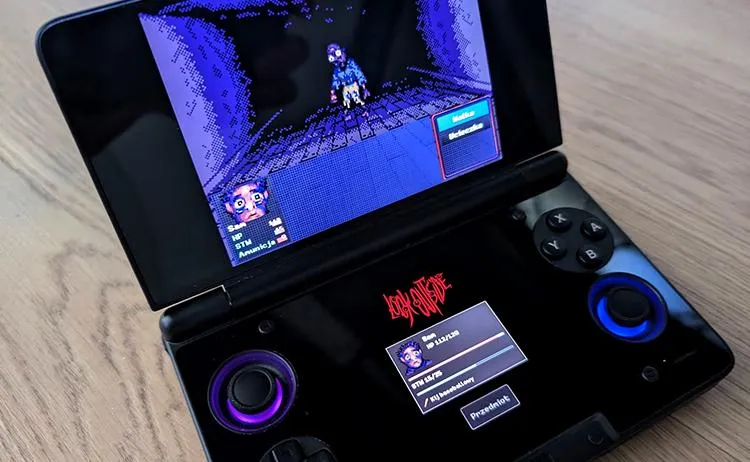
On devices with a second screen, such as the AYN Thor, PadPort can show extras there. This is experimental and works only with specific games: Look Outside (MZ) shows your party with portraits, HP, stamina, status and gear, plus an inventory button to pick and use items on the bottom screen; To the Moon (XP) shows a notebook with Characters, Notes and Items; Fear & Hunger (MV) shows your party with Body and Mind, lost limbs, conditions and equipment. When you add one of these games, PadPort asks if you want the second screen, and you can turn it on or off any time in the game's ⋮ menu. Battle commands and the game's own menus stay on the main screen.