AI-generated page. This page was automatically generated from a source and a project page and may contain inaccuracies or outdated information. Please verify details with the original source.
PokeDaisy
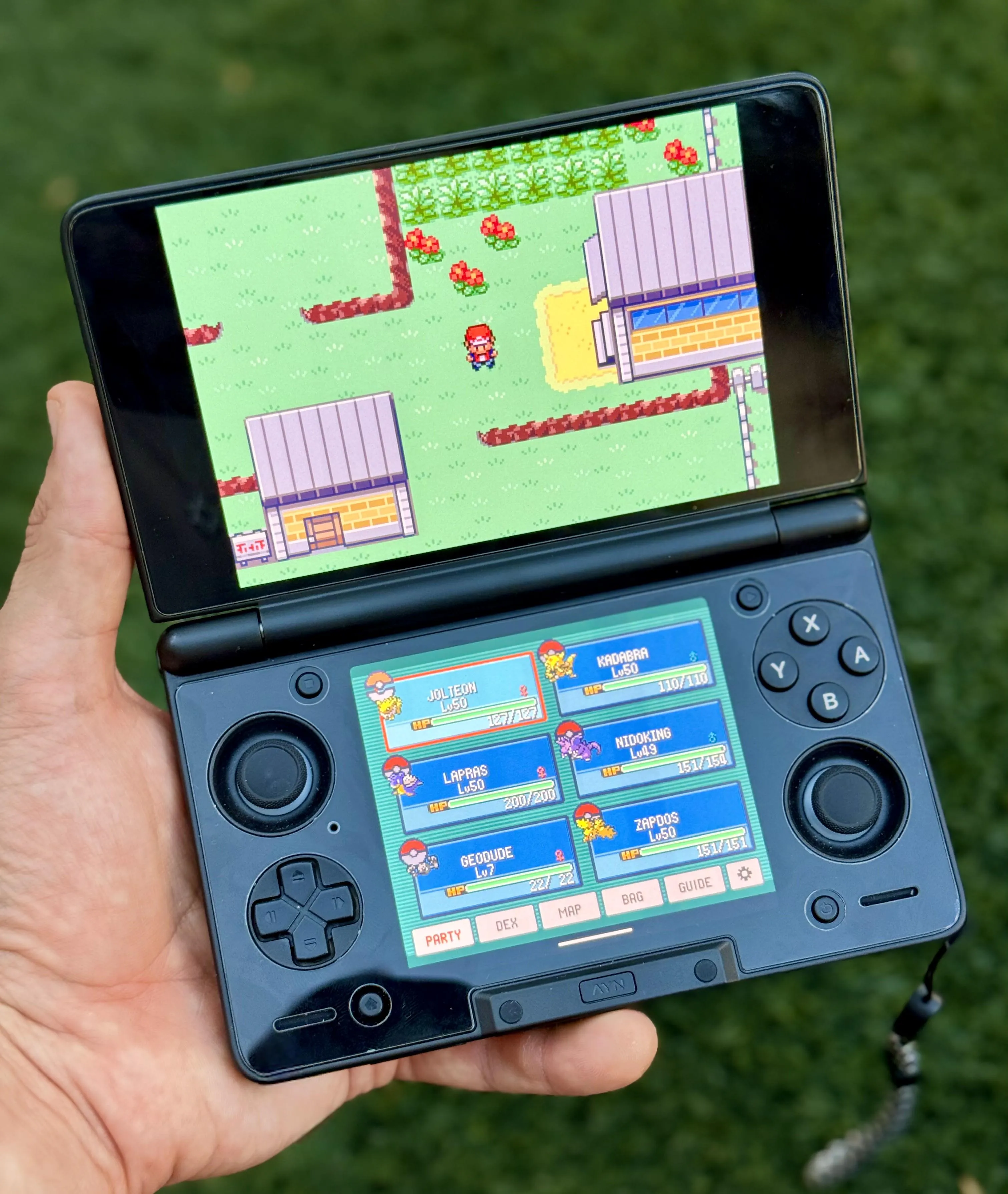
A Game Boy, Game Boy Color, GBA and DS player for Android handhelds with two screens or one, with a live companion for Pokémon games and ROM hacks of every generation from Red to Black 2 and White 2.
Description
PokeDaisy is a Game Boy, Game Boy Color, GBA and Nintendo DS player for Android handhelds with two screens or one, made for Pokémon games of every generation from Red to Black 2 and White 2 and popular ROM hacks. The game runs on the top screen. The bottom screen is a live companion that reads your game's memory as you play, so it always shows your real party, bag, map, battle matchups, Pokédex and a spoiler-free guide, drawn in the game's own menu style. It is free and open source, with no ads, accounts or tracking, and it updates itself. No games are included — bring your own legally dumped ROMs.
Made for the AYN Thor. It also works on the Retroid Pocket Duo Lite (its 4:3 bottom screen has its own layout) and the Retroid Pocket 6 (single screen, tested), and should work on the Retroid Pocket Duo and the Anbernic RG DS, though not yet tested on real hardware. Any Android 8.0+ device runs the games. On a dual-screen device the companion gets the bottom screen to itself, and swapping screens is an option. On a single-screen device the companion is a panel beside the game: press BACK to slide it in over the game, tap the padlock on its edge to lock it beside the game, and drag that tab sideways to resize it; held upright, the game sits across the top with the companion docked under it. A HUD keeps your party, a minimap and your bag on the game screen, and the quick menu (L3) opens a ring of actions like a modern game's weapon wheel. For DS games, the touch screen goes on the bottom screen and one tap swaps it for the companion and back; on a one-screen device, hold it sideways and the touch screen floats in when the game needs it, with five layouts (L2 brings it in, R2 switches the layout). Cast or plug in a TV and the game goes on the big screen while the companion stays in your hand.
The companion also has BOXES (your PC, laid out like the game's box screen, to move Pokémon between a box and your party), trade evolutions from a Pokémon's summary, a game volume slider with MUTE GAME and a mute hotkey, BATTLE FOCUS (battle info on one page), a DS CPU BOOST for fewer slowdowns, and TOOLS in the library: PATCH A ROM, LINK PLAY, SAVE EDITOR and TRADE SAVES, plus more save-backup options.
Site and manual: pokedaisy.com. Video review: youtube.com.
Features
The companion
- PARTY – your team with HP, levels and status, in your game's own party screen. Tap a Pokémon for its full summary: stats, moves, EXP, and what it's weak or resistant to. STATS shows its exact IVs, EVs, nature and Hidden Power. LEARN lists the moves it learns next and the TMs in your bag it can use, each rated LEARN / FORGET a move / SKIP, with the reasons (original games so far).
- BAG – every pocket, with item icons and descriptions. Pick a TM to see who can learn it, and who it suits best (original games so far).
- BATTLE – opens by itself when a battle starts. Shows move effectiveness, the foe's weaknesses, the best Pokémon and move for the fight, and the trainer's remaining team. INFO has a STATS button that puts your numbers next to the foe's (foe IVs are off by default; turn on FOE IVS in Settings). BATTLE FOCUS puts the battle INFO on one page. Touch buttons to fight, switch or run (FireRed and Emerald).
- MAP – the game's region map with you on it. Tap any place to name it, or search the list of every town and route.
- DEX – your Pokédex with seen/caught marks and full entries: sprite, types, stats, abilities, dex text, evolutions, wild locations by route and movesets.
- GUIDE – hints first, answers on a second tap: what's catchable here, the next gym leader's team, evolutions, plus "WHERE IS" and "STUCK?" pages.
- BOXES – your PC in the companion, laid out like the game's box screen. Tap a Pokémon for its summary, WITHDRAW it into your party (or swap it with one there), or DEPOSIT a party Pokémon from its summary. Works on FireRed, LeafGreen, Emerald, Ruby and Sapphire in every language, Unbound, Radical Red, SoulGold and most hacks built on those games; depositing works on FireRed, LeafGreen and Emerald in English, German, French, Italian and Spanish, and a few FireRed hacks.
- TRADE EVOLUTIONS – evolve a trade-evolving Pokémon straight from its summary, no trade needed.
- CARD – your trainer card, drawn exactly like the game's, front and back.
- STATES – 10 save-state slots with screenshots.
- CHEEVOS – RetroAchievements (beta, softcore): your progress and challenges, unlock popups, leaderboards and the game's own level-up fanfare on every unlock. Sign in from the top-screen Settings; your password is used once and never stored, only your username and RA's login token stay on the device, and the app talks only to RetroAchievements. Hardcore isn't available yet: RetroAchievements only accepts it from emulators it has validated, which takes 6+ months of the app being public.
- NUZLOCKE – per game (GBA games, except Emerald Rogue): keeps score of a Nuzlocke run, the first encounter in each area and every fainted Pokémon out for good, with a gravestone on its party slot.
- CHEATS – GameShark, Action Replay and CodeBreaker, toggled from the companion.
- Customizable tabs: pick which ones show up in the tab bar; the rest wait as app icons in the MORE tab.
On the game screen
- HUD – your party (levels, HP, status), a minimap, your Poké Balls and PC / BAG / WILD buttons on the game screen while you walk around, like a modern Pokémon game. A tap opens a Pokémon's summary, the whole map (with FLY), your game's own PC, a compact bag with USE, or the area's wild Pokémon; the game keeps running under them. Four layouts, three looks, three sizes, and each part can be hidden. It steps aside for battles and menus.
- Quick menu (L3) – PC, FLY, the keep-away spray, BIKE, ROD, WILD encounters on / off, SAVE STATE, LOAD STATE, fast-forward and the companion, as a ring you aim with the left stick (or rows of tiles). Pick which actions show; anything that can't be used right now is greyed out and says why.
- Battle buttons – FIGHT, POKéMON and RUN at the top right, beside the battle. FIGHT lists your moves with how well each one hits, POKéMON your party with the best pick tagged.
- EXPAND + ZOOM – the overworld drawn past the screen's edges to fill a wide screen, with zoom out (R3) and look-around with the right stick. Battles are wide too. Works on FireRed, LeafGreen, Emerald, Ruby and Sapphire, many ROM hacks, Pokémon Yellow and Crystal on the Game Boy, and Platinum, HeartGold and SoulSilver on the DS.
- QoL – auto-run, running indoors, PC from anywhere, FLY, bike, fishing rod and Repel in one press, a switch to turn wild encounters off, and reusable TMs.
- Smart fast-forward – drops to 1x in menus and on the map, keeps battles fast, plus slow motion and a speed cap (1.5× to 10×, or no cap).
- Fast-forward music (alpha) that keeps playing the song at its normal speed instead of chipmunk sound.
- Rewind (optional) – hold the REWIND HOLD hotkey to play the last ~20 seconds backwards. It never touches your save file.
- Real-time clock for the games that use one (Ruby, Sapphire, Emerald and ROM hacks): day and night, berries, tides and daily events follow the device's clock.
- Game speed – a pace that stays per game: 0.25×, 0.5×, 1×, 1.5×, 2×, 3× or 4×.
- Game volume – a GAME VOLUME slider, MUTE GAME and a MUTE hotkey.
- DS CPU BOOST – fewer slowdowns in DS games.
- Shaders (optional) – an LCD grid, scanlines or a CRT look, and the colours as the GBA's own screen showed them, on the game and, if you like, the companion screen too. Edge smoothing (xBRZ, xBR, ScaleFX) on the game. UNLIT SCREEN shows the first GBA's screen with no light behind it.
- Overlays (optional) – a frame around the game: two of PokeDaisy's own, or your own RetroArch overlays (a
.cfgwith its PNG, a.zipof them, or any PNG with a see-through screen). None come bundled. - Controls – remap every game button and hotkey, or turn hotkeys off. X and Y act as a second START/SELECT (configurable). TURBO A and TURBO B can go on any button. Touch controls appear when no controller is connected, with ready-made layouts, size, opacity and EDIT LAYOUT to drag and resize each button. Bluetooth and USB controllers (8BitDo, GameSir, Xbox, ...) connect while a game is running without restarting it, and HOME / guide works like a BACK tap for the companion.
- Settings search – type what you're after and the matching settings show, whatever PokeDaisy calls them.
- Themes – PokeDaisy (the default) or game-coloured ones for the library and settings, with 8 new themes and a few for the holidays.
- Makeovers – play one game as another game's hero, a Pokémon following you, and day and night tints.
- Stretch option for 16:9 top screens.
Saves, library and more
- Saves are standard
.sav/.srmfiles, the same format as mGBA and RetroArch, so you can move them between emulators freely. Every start backs up your save (see RESTORE BACKUP in the Library), with more SAVE BACKUPS options. To share saves with RetroArch, add its save folders under Settings > FOLDERS > ALSO LOOK IN. - Library with SteamGridDB or RetroAchievements box art, list or grid view, recently played, favorites, clean game names, and long-press options to rename, hide, load a save or see game info. Refresh rescans your ROMs folder and tells you what it found.
- TOOLS in the library: PATCH A ROM (BPS patching that finds the base ROM by itself), LINK PLAY (two to four GBA games at once on one link cable, to trade — trade evolutions too — battle and mix records between your games or two saves of one), SAVE EDITOR (rearrange a game's PC, change its bag and moves) and TRADE SAVES (trade Pokémon between two of your games' save files with the games closed; FireRed, LeafGreen, Emerald, Ruby and Sapphire, by the games' own rules).
- Dual-screen launcher – with two screens, the game list is on one and the game you're on on the other: its cover, when you last played it and whether it has a save. X swaps the screens, A opens the game, B its options, Y Settings.
- Zipped
.zipand.7zROMs work in your ROMs folder, the + import and frontends; plain.gba,.gb,.gbcand.ndsfiles work too. - Games the companion can't read yet are tagged NOT SUPPORTED, with an ASK FOR SUPPORT button. Best effort: PokeDaisy reads the ROM as each game it knows and keeps the one that fits; when no game clearly fits, the companion asks WHICH GAME IS THIS? with the likely ones first.
- Works with frontends like ES-DE, Cocoon and iiSU. They can launch a game straight into PokeDaisy.
- App text in English, Japanese, French, German, Italian, Spanish and Portuguese (Brazil's and Portugal's). It follows the ROM's language by default; change it with the LANGUAGE row in Settings. Pokémon, move and item names stay as the game has them.
- Save states on hotkeys, with undo, full button remapping, themes, and an optional status bar (game, location, money, clock and battery).
Supported games
Any Game Boy, Game Boy Color, GBA or DS game plays. The companion needs one of the games below, in the exact version listed (ROM hacks are recognized by their file, so another version shows a "not supported" notice). ✅ works · ◐ partly · — not yet.
- Pokémon Red / Blue (GB, USA/Europe): ✅ Party, Bag, Map, Dex, Guide · ◐ Battle
- PureRed / PureBlue (GB, 2.7.6): ✅ Party, Bag, Map, Dex · ◐ Battle · — Guide
- Pokémon Yellow (GB, USA/Europe): ✅ Party, Bag, Map, Dex, Guide · ◐ Battle
- Pokémon Yellow (GB, DE / FR / IT / ES): ✅ Party, Bag, Map, Dex, Guide · ◐ Battle
- Pokémon Gold / Silver (GBC, USA/Europe): ✅ Party, Bag, Map, Dex · ◐ Battle · — Guide
- Pokémon Crystal (GBC, USA, USA/Europe rev 1, AU): ✅ Party, Bag, Map, Dex, Guide · ◐ Battle
- Crystal Clear (GBC, 2.5.11, 2.6.0): ✅ Party, Bag, Map, Dex · ◐ Battle · — Guide
- Prism (GBC, 0.95 build 254): ✅ Party, Bag, Map, Dex · ◐ Battle · — Guide
- Polished Crystal (GBC, 3.2.0–3.2.3): ✅ all features
- Pokémon FireRed (USA/Europe, rev 0 and 1): ✅ all features
- Pokémon FireRed (ES / DE / FR / IT / JP): ✅ all features
- Pokémon LeafGreen (USA/Europe, rev 0 and 1): ✅ Party, Bag, Map, Dex, Guide · ◐ Battle
- Pokémon LeafGreen (ES / DE / FR / IT / JP): ✅ Party, Bag, Map, Dex, Guide · ◐ Battle
- Pokémon Emerald (USA/Europe): ✅ all features
- Pokémon Emerald (ES / DE / FR / IT / JP): ✅ all features
- FireRed / Emerald, randomized (UPR ZX 4.6.1, USA/Europe): ✅ Party, Bag, Battle, Map, Dex · ◐ Guide
- Pokémon Ruby (USA, rev 0, 1 and 2): ✅ Party, Bag, Map, Dex, Guide · ◐ Battle
- Pokémon Ruby (ES / DE / FR / IT / JP, rev 0–1): ✅ Party, Bag, Map, Dex, Guide · ◐ Battle
- Pokémon Sapphire (USA, rev 0, 1 and 2): ✅ Party, Bag, Map, Dex, Guide · ◐ Battle
- Pokémon Sapphire (ES / DE / FR / IT / JP, rev 0–1): ✅ Party, Bag, Map, Dex, Guide · ◐ Battle
- Pokémon Platinum (DS, USA rev 1): ✅ Party, Bag, Map, Dex, Guide · ◐ Battle
- Pokémon HeartGold (DS, USA, Germany rev 0): ✅ Party, Bag, Map, Dex, Guide · — Battle
- Pokémon SoulSilver (DS, USA, Germany rev 0): ✅ Party, Bag, Map, Dex, Guide · — Battle
- Pokémon Black (DS, USA/Europe): ✅ Party, Bag, Map, Dex, Guide · ◐ Battle
- Pokémon White (DS, USA/Europe): ✅ Party, Bag, Map, Dex, Guide · ◐ Battle
- Pokémon Black 2 (DS, USA/Europe): ✅ Party, Bag, Map, Dex, Guide · ◐ Battle
- Pokémon White 2 (DS, USA/Europe): ✅ Party, Bag, Map, Dex, Guide · ◐ Battle
- Origin HeartGold (DS, 4.0.3 English 1.0.0): ✅ Party, Bag, Map, Dex · ◐ Battle · — Guide
- Pokémon Unbound (2.1.1.1): ✅ Party, Bag, Map, Dex, Guide · ◐ Battle
- Pokémon Unbound (2.1.1.1 French): ✅ Party, Bag, Map, Dex, Guide · ◐ Battle
- Pokémon Radical Red (4.1): ✅ Party, Bag, Map, Dex, Guide · ◐ Battle
- Pokémon Gaia (3.2): ✅ Party, Bag, Map, Dex, Guide · ◐ Battle
- Pokémon Odyssey (4.1.1): ✅ Party, Bag, Map, Dex, Guide · ◐ Battle
- Pokémon Heart and Soul (2.0.6): ✅ all features
- Pokémon Amethyst (1.3.0, 1.4.1): ✅ Party, Bag, Map, Dex, Guide · ◐ Battle
- Celia's Stupid Romhack (1.1.4): ✅ Party, Bag, Map, Dex, Guide · ◐ Battle
- Orange Islands (Beta 5.7, an older beta): ✅ Party, Bag, Map, Dex, Guide · ◐ Battle
- Ultra Violet (1.22): ✅ Party, Bag, Map, Dex, Guide · ◐ Battle
- FireRed Rocket Edition (the one release): ✅ Party, Bag, Map, Dex, Guide · ◐ Battle
- Ash Gray (4.5.3, Fork Bug Fix 1.0): ✅ Party, Bag, Map, Dex, Guide · ◐ Battle
- Ghost Grey (1.0.1, 1.0.2, 1.0.4): ✅ Party, Bag, Map, Dex, Guide · ◐ Battle
- Let's Go Pikachu / Eevee (English, 4 builds): ✅ Party, Bag, Map, Dex, Guide · ◐ Battle
- Sword and Shield Ultimate Plus (1.2.1.2 + its 3 patches): ✅ Party, Bag, Map, Dex, Guide · ◐ Battle
- GS Chronicles (2.7.6): ✅ Party, Bag, Map, Dex, Guide · ◐ Battle
- Recharged Yellow (1.8.0, 1.9.0, 1.9.4, 1.9.7): ✅ Party, Bag, Map, Dex, Guide · ◐ Battle
- Emerald Legacy (1.1.4): ✅ Party, Bag, Map, Dex, Guide · ◐ Battle
- Pokémon Lazarus (2.0): ✅ Party, Bag, Map, Dex · ◐ Battle, ◐ Guide
- Emerald Seaglass (3.0): ✅ Party, Bag, Map, Dex · ◐ Battle, ◐ Guide
- Too Many Types 2 (1.5.2): ✅ Party, Bag, Map, Dex · ◐ Battle, ◐ Guide
- Glazed (9.2.0): ✅ Party, Bag, Map, Dex · ◐ Battle, ◐ Guide
- Emerald Imperium (1.3.1): ✅ Party, Bag, Map, Dex · ◐ Battle, ◐ Guide
- Quetzal (English Alpha 9 v0): ✅ Party, Bag, Map, Dex · ◐ Battle, ◐ Guide
- Quetzal (Spanish Alpha 9 v0): ✅ Party, Bag, Map, Dex · ◐ Battle, ◐ Guide
- Quetzal (Alpha 9 v1, EN / ES): ✅ Party, Bag, Map, Dex · ◐ Battle, ◐ Guide
- Quetzal (Alpha 0.8.4, EN / ES): ✅ Party, Bag, Map, Dex · ◐ Battle, ◐ Guide
- Moemon Quetzal (Alpha 0.8.4 Hotfix, EN / ES): ✅ Party, Bag, Map, Dex · ◐ Battle, ◐ Guide
- Super Mariomon (1.2.1–1.3, 1.5.1, 1.5.2): ✅ Party, Bag, Map, Dex · ◐ Battle, ◐ Guide
- Recharged Emerald (2.2.5, 2.2.8, Rebalanced): ✅ Party, Bag, Map, Dex · ◐ Battle, ◐ Guide
- Elite Redux (2.65.3b, 2.65.4.1b): ✅ Party, Bag, Map, Dex · ◐ Battle, ◐ Guide
- Team Rocket Dragonsden (1.5): ✅ Party, Bag · ◐ Battle, ◐ Map · — Dex · ◐ Guide
- Team Rocket Dragonsden (2026 3.0.9, Spanish): ✅ Party, Bag, Map, Dex · ◐ Battle, ◐ Guide
- Wishes of Tomorrow (1.2.6): ✅ Party, Bag, Map, Dex · ◐ Battle, ◐ Guide
- Dreamstone Mysteries (the one release): ✅ Party, Bag, Map, Dex · ◐ Battle, ◐ Guide
- Monomyth (1.0): ✅ Party, Bag, Map, Dex · ◐ Battle, ◐ Guide
- Emerald Rogue (2.2.1-EX): ✅ Party, Bag, Battle, Map, Dex · — Guide
- Pokémon SoulGold (1.1.4, 1.2, 1.2.1): ✅ Party, Bag, Map, Dex · ◐ Battle, ◐ Guide
- Pokémon R.O.W.E. (2.1.9.1 Experimental): ✅ Party, Bag · ◐ Battle, ◐ Map, ◐ Dex · — Guide
Red, Blue, Yellow, Gold, Silver, Crystal and the Crystal hacks Crystal Clear, Prism and Polished Crystal are the Game Boy games the companion reads, each in the game's own look (its font, icons and town maps, rebuilt from your ROM; Red and Blue in the colours a Super Game Boy gives them). The German, French, Italian and Spanish Yellows show their own names, Pokédex pages and battle words. Prism shows its own Pokémon, moves, types, six town maps and its own Pokédex. Polished Crystal shows its own Pokémon (regional forms included), moves, types, items, its Johto, Kanto and Orange Islands maps and its 289 in National order; its faithful builds keep the original games' types and moves.
Platinum, HeartGold, SoulSilver, Black, White, Black 2, White 2 and the Origin HeartGold hack are the DS games the companion reads, in the releases listed (Platinum's revision 1, Black's, White's, Black 2's and White 2's USA/Europe releases, HeartGold's and SoulSilver's USA and German releases); their pictures, Pokédex pages and maps come from your cart. Platinum's, Black's, White's, Black 2's and White 2's battles show in the BATTLE tab, HeartGold's and SoulSilver's not yet, and on the DS the battle buttons don't press the game's menus yet. Origin HeartGold's battle system is its own: the battle panes read it, but their buttons can't press its menus, and it has no guide yet. On a one-screen device, hold it sideways and the touch screen floats in when the game needs it, with five layouts (L2 brings it in, R2 switches the layout).
Map ◐ means place names only, without the map picture. Guide ◐ means the live pages only (the wild encounters here and the next boss), without the area lists. Battle ◐ means the battle panes work but haven't been checked in every kind of battle. Team Rocket Dragonsden is DragonsdenTV's Team Rocket Edition, not FireRed Rocket Edition. FireRed (rev 0 and 1) and Emerald randomized with Universal Pokémon Randomizer ZX 4.6.1 work with any settings and seed: the companion reads the randomized types, moves, teams, wild Pokémon and items from the ROM, and the guide leaves out the gift and legendary Pokémon it can't know. Monomyth's natures are its own: the summary names them, and they change no stat. With Wishes of Tomorrow's randomizer on, the guide and the Pokédex's AREA show the wild Pokémon your save meets. The guides were written from each game's own data and may contain mistakes; the app says so the first time you open one.
Setup guide
- Download
PokeDaisy-<version>.apkfrom the latest release on the device. - Open it. If Android asks, allow your browser or file manager to install apps.
- Open PokeDaisy. A short setup helps you:
- Link your ROMs folder (optional). Every supported game in it shows up in your library, played right where it is. New games are picked up every time you open the app.
.zipand.7zROMs work too. - Choose where saves go. Use PokeDaisy's own folder, or point it at another emulator's (like RetroArch's) to keep playing the same saves.
- Add cover art (optional) with a free SteamGridDB or RetroAchievements Web API key.
- Link your ROMs folder (optional). Every supported game in it shows up in your library, played right where it is. New games are picked up every time you open the app.
- You can change all of this later in Settings. The full manual is at pokedaisy.com/docs, and inside the app under Settings > HELP.
Updating from the old PokeDaisey: the app was renamed from PokeDaisey to PokeDaisy, and Android treats it as a brand new app, so uninstall the old PokeDaisey to avoid having both on your device. If your ROMs and saves live in your own folders (like RetroArch's), nothing is lost — just point the new app at them in the first-time setup. If you kept saves in the old app's own folder (Android/data/com.pokedaisey.app/), copy them out before uninstalling, since Android deletes that folder with the app. Settings start fresh in the new app.
No games are included — use your own legally dumped ROMs. PokeDaisy checks for a new version each time you open it and offers to install it; you can also check from Settings > VERSION.
Frontends: step-by-step guides to launch games from iiSU and ES-DE. ES-DE, Cocoon and iiSU can launch a game straight into PokeDaisy.