AI-generated page. This page was automatically generated from a source and a project page and may contain inaccuracies or outdated information. Please verify details with the original source.
Selaco
The handheld's bottom panel becomes Selaco's own codex — datalogs, objectives, milestones, statistics and the manual — while the top screen stays the game.
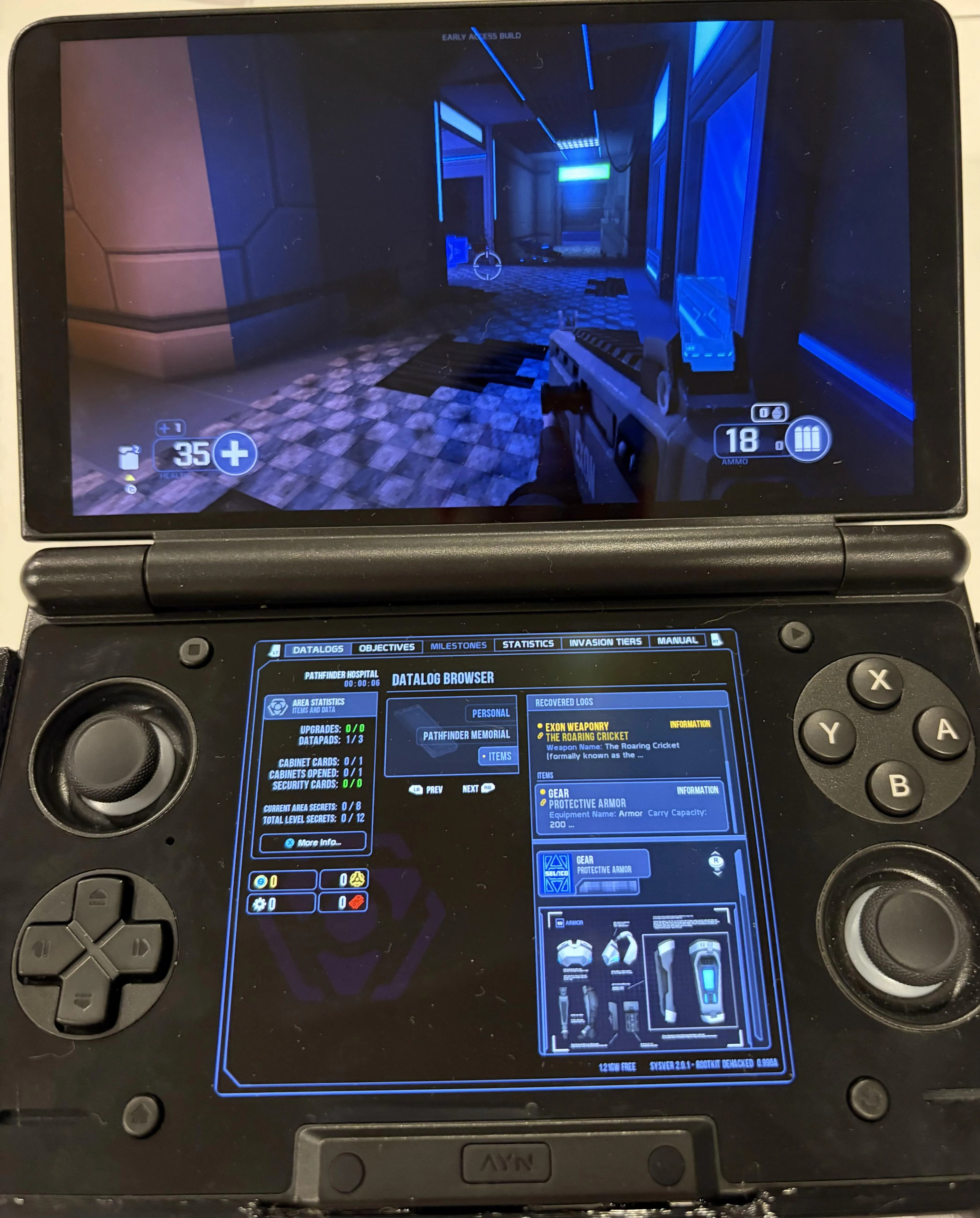
What's on the panel
- Codex — the game's own PDA rather than a reproduction: datalogs, objectives, milestones, statistics and the manual. Open your codex and the lower panel goes live and gamepad-driven; close it and it becomes the standby codex, which keeps your last tab and refreshes when you find a secret.
- Size — adjustable in Options → Handhelds, from 1.00 to 2.00 (default 1.75), along with turning the panel off entirely.
Pick your device on first launch
Selaco's two first-run dialogs are replaced by one device picker: AYN Thor, AYN Odin 2, AYN Odin, or a Steam Deck preset. That choice sets graphics, handheld UI, controls and the second screen together. Change it later with Options → Handhelds → Reset Device Choice.
Setup guide
You need to own Selaco — no game data is included. Copy Selaco.ipk3 from your
Steam install to Internal storage/Selaco/, install the APK, then pick your
device on first launch. A gamepad is required (there are no touch controls) and
Vulkan 1.1+ is mandatory.