AI-generated page. This page was automatically generated from a source and a project page and may contain inaccuracies or outdated information. Please verify details with the original source.
SquareDS
An unofficial Spotify Premium and YouTube Music client with a Liquid Glass interface, adapted for the AYN Thor's dual screens.
Description
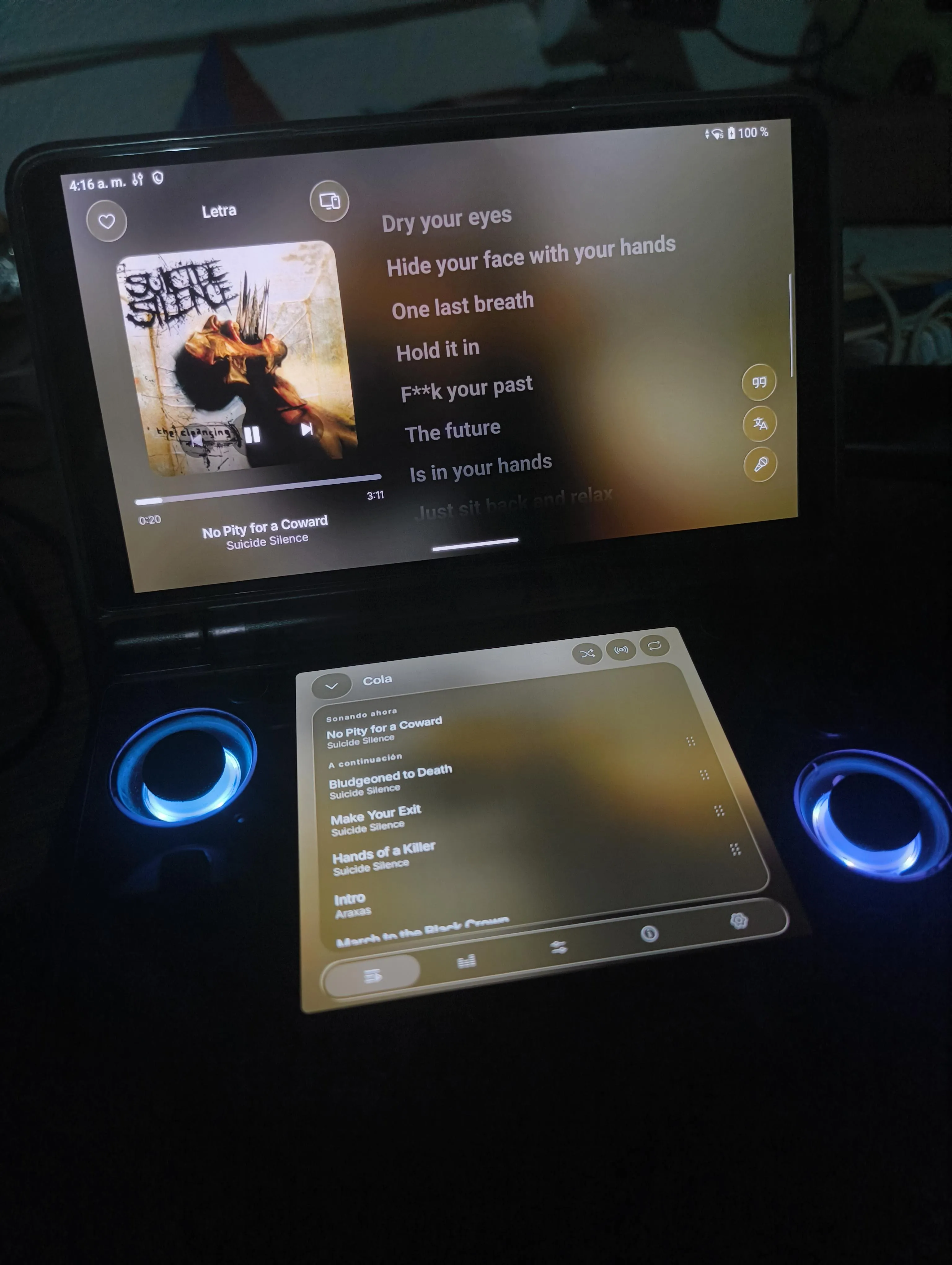
SquareDS is an unofficial fork of Square, adapted for Android devices with two independent displays and tested on the AYN Thor running its original Android firmware without root. Instead of duplicating the interface on both screens, the app separates music playback from navigation: the upper screen stays dedicated to the music player and synced lyrics, while the lower screen handles browsing, playlists, the queue, EQ, audio effects, and settings. It preserves Square's Liquid Glass design, music services, audio engine, and functionality, and is powered by a Rust core built on librespot. Compatibility with other dual-screen devices has not yet been verified.
Features
- Dual-screen layout: on the AYN Thor the upper display shows a permanent, expanded music player, while the lower display keeps Square's original navigation experience.
- Upper display: album artwork, playback controls, track title/artist/duration/progress, synchronized lyrics with visual effects, lyrics translation, karaoke controls, song favorites, Spotify Connect, dynamic colors, and Liquid Glass effects.
- Lower display: Home, New, Radio, Library, and Search; albums, artists, and playlists; a persistent mini-player; and an expandable playback tools panel with playback queue, shuffle and repeat, Song Radio, equalizer, audio effects, track information, and playback settings.
- Spotify Premium: personal playlists and library, Spotify Connect, listening history, music discovery and recommendations, song credits.
- YouTube Music: music catalogue and search, optional Google account sign-in, personal playlists and albums, music videos.
- Playback: dynamic album artwork and Canvas support, synchronized lyrics, Song Radio and autoplay, crossfade, sleep timer, playback queue, shuffle and repeat, background playback.
- Audio effects: equalizer, playback speed and pitch, reverb, audio effect presets, karaoke vocal reduction, streaming quality settings.
- Library and offline: playlists, albums, artists, liked songs, search history, local music files, music downloads, offline playback, automatic downloads where supported.
- Interface: Liquid Glass materials, adjustable blur, refraction, and tint, dynamic colors, floating navigation elements, and eight languages (English, Italian, Spanish, French, German, Portuguese, Hindi, Turkish).
Requirements
- Android 8.0 or later (the original Square minimum requirement).
- An ARM64 Android device for the AYN Thor APK.
- Spotify Premium for Spotify playback.
- An internet connection for streaming and initial service configuration.
- A compatible Android multi-display configuration for dual-screen operation.
Setup guide
- Download the latest APK from the GitHub Releases page; for AYN Thor, select the ARM64 APK when available.
- Enable installation from the appropriate source in Android settings, then install the downloaded APK.
- Install and open the app, then complete the initial Spotify or YouTube Music setup.
- Open Settings and enable the AYN Thor / dual-screen option.
- Verify that the player appears on the upper display and navigation appears on the lower display.
- At first launch the app asks which music service to use: YouTube Music playback works without signing in (Google account authentication is optional for personal library features), while Spotify requires a Premium account and, per the original Square setup, registering a Spotify developer application and configuring its client ID.