AI-generated page. This page was automatically generated from a source and a project page and may contain inaccuracies or outdated information. Please verify details with the original source.
Thor RTS
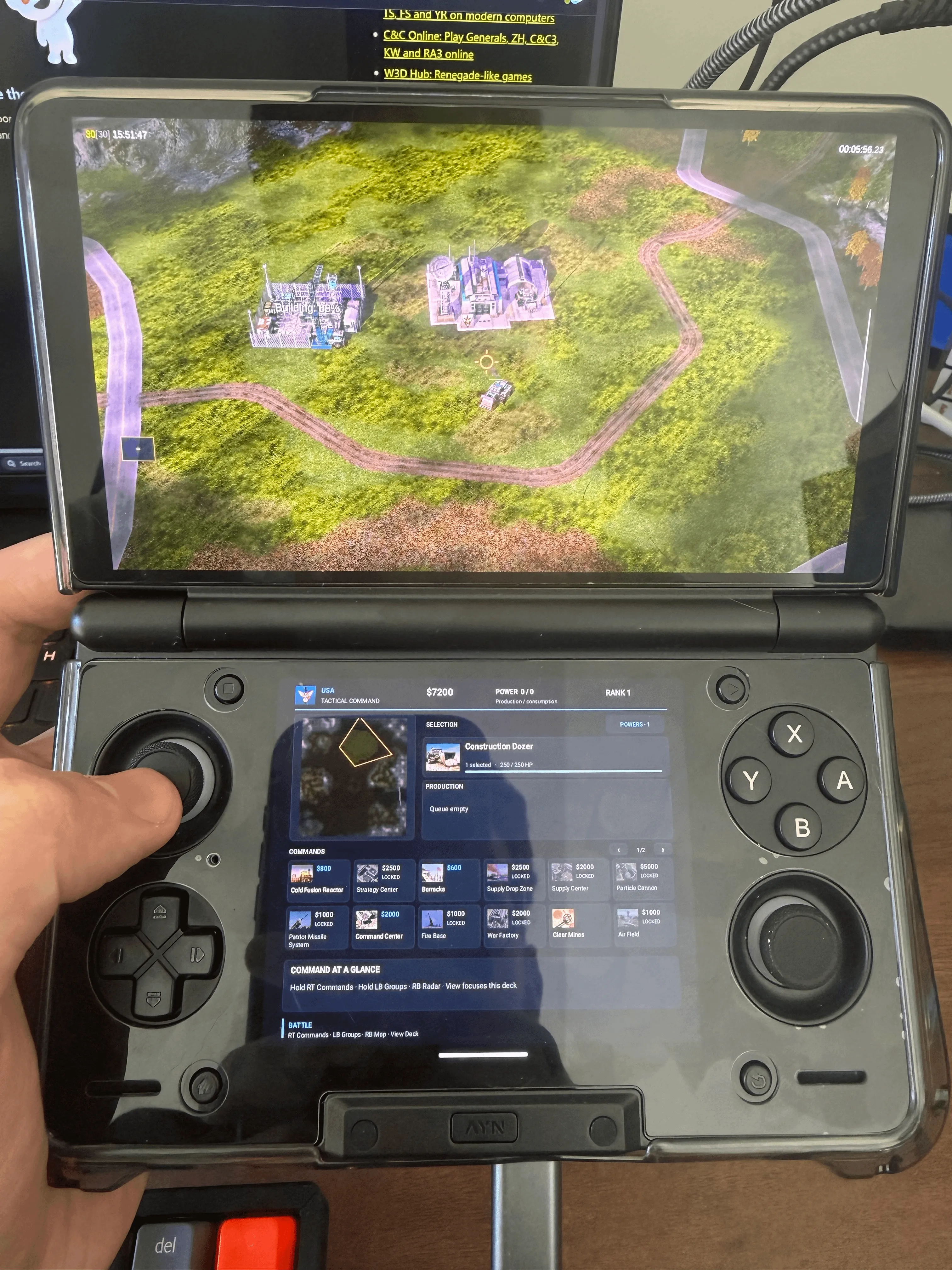
A native Android port of Command & Conquer: Generals Zero Hour for the AYN Thor, with controller support and a two-screen command deck.
Description
Thor RTS is a native Android port of Command & Conquer: Generals Zero Hour built for the AYN Thor's two screens. The battlefield runs on the top screen, while the bottom screen shows the minimap, selected units, building commands, production queues and General's Powers. You can play with sticks and buttons, touch, or both. The game runs natively on Android with the original 30 Hz simulation. No game files are included — you need your own PC copy of Zero Hour; the Steam edition is the one tested so far. This is a development preview, currently 0.1.0-alpha.5.
Features
- Full controller support, modeled on how Age of Empires Definitive Edition works on Xbox.
- Dual-screen support: the bottom screen controls the minimap, action selection and more, leaving the top screen for the battlefield.
- Full touch screen support on both screens.
- On the main screen: pinch to zoom, rotate, single-finger rectangle selection and two-finger camera pan.
- Command wheel (RT), control groups (LB) and minimap control (RB).
- Bottom screen shows health, veterancy, rank progress, construction progress, reinforcement countdowns and active toggles such as Overcharge.
- Runs natively on Android with the original 30 Hz simulation.
Requirements
- AYN Thor handheld running Android 13.
- Your own PC copy of Command & Conquer: Generals Zero Hour (Steam edition tested). Keep the whole folder, including ZH_Generals.
- A desktop computer to run the installer: Windows 10/11 x64, Apple Silicon Mac (macOS 13+), Intel Mac (macOS 13+), Ubuntu/Debian x64, or another Linux desktop (x64).
- USB data cable and USB debugging enabled on the Thor.
Setup guide
- Install Zero Hour on your PC. In Steam, use Manage → Browse local files. Keep the whole folder, including ZH_Generals. On a Mac, bring that folder over from your PC.
- Download the desktop installer for your computer and the alpha.5 APK.
- Connect the Thor: enable USB debugging, connect a USB data cable and accept the debugging prompt on the Thor.
- Browse to the game folder. Under Advanced → Local APK, choose the alpha.5 APK. Refresh the device list and choose the Thor. The installer can download ADB if you need it.
- Press Install on Thor. Once it finishes, open Thor RTS on the handheld and press Play.