AI-generated page. This page was automatically generated from a source and a project page and may contain inaccuracies or outdated information. Please verify details with the original source.
TotK Native
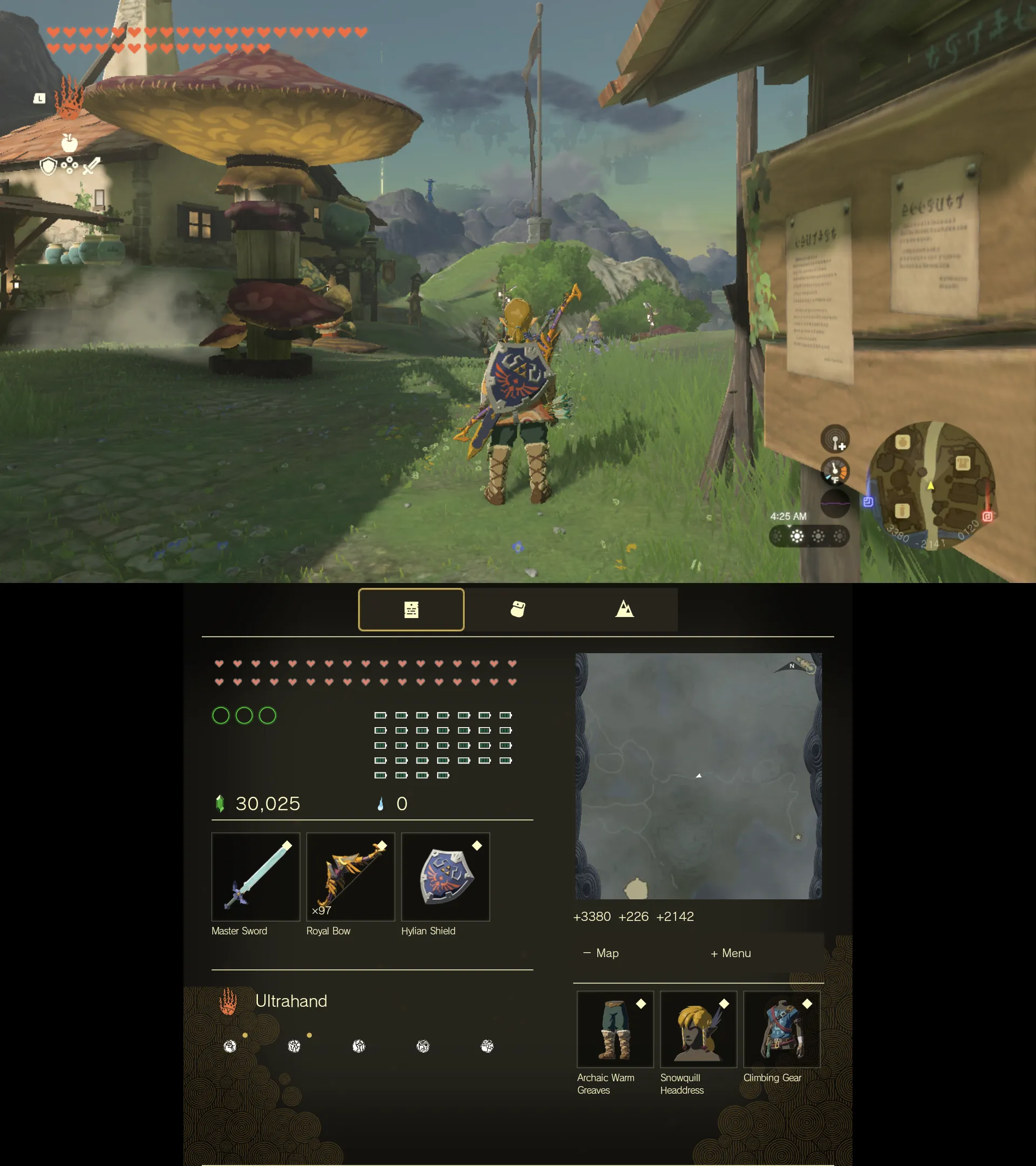
Native Android port of The Legend of Zelda: Tears of the Kingdom 1.4.3 with a dual-screen companion for the AYN Thor.
Description
TotK Native runs The Legend of Zelda: Tears of the Kingdom 1.4.3 natively on Android handhelds with a Qualcomm Adreno GPU. It is not an emulator: the game's own code is prepared once, on your device, to run directly on its processor, and its graphics are drawn by a bundled Vulkan driver. The app contains no game files — you point it at your own dump of the game, and it builds everything it needs on the device. A controller-friendly pre-game menu lets you pick graphics presets, controls and saves before you play. On the AYN Thor (and the Retroid Pocket Duo), a dual-screen companion shows Link's status, the map and the inventory on the second screen, and lets you equip, eat and fuse items from it while you play.
Features
- Runs the game natively at 30 fps or 60 fps from a single APK.
- On-device setup from either a decrypted RomFS + ExeFS dump, or base XCI/NSP + 1.4.3 update + your keys.
- Pre-game menu with presets, explanations for every setting, and a default profile picked for your chip.
- Dual-screen companion on the AYN Thor and Retroid Pocket Duo: status, map and inventory on the second screen, with item actions (equip and unequip weapons, bows, shields and armor; eat food and edible materials; drink elixirs; use fairies; take out a material or Zonai device; and fuse a material to your arrows with the bow drawn).
- Graphics options: presets, 30/60 fps, render resolution, FSR 1 and Snapdragon GSR upscaling, FXAA/SMAA, shadow quality, handheld or docked mode, a performance overlay, and experimental frame generation and native HUD.
- Saves: export and import (also from JKSV, Checkpoint, Ryujinx or yuzu dumps), automatic backups, and an optional synced save folder.
- Game data in internal storage, on an SD card, or in a folder you choose.
Setup guide
- Download the latest TotK-Native APK from the Releases page and install it (allow installs from your browser or file manager).
- Copy your dump of the game to the device or an SD card.
- Open TotK Native and press Begin setup.
- Choose where the game data goes — internal storage is recommended (fastest); the SD card or a folder you choose work too.
- Pick your route: a decrypted RomFS + ExeFS dump, or the base game XCI/NSP + 1.4.3 update + your keys.
- Choose your files with the file picker. Each file is checked as soon as you pick it; when everything is there, press + or Continue.
- Choose whether to check GitHub for a newer app version when the game starts (On by default).
- Prepare: the game is built on the device. With a decrypted dump on internal storage this took about 1 minute 45 seconds on an AYN Thor.
- Choose graphics opens with your device's preset selected. Press + to play.
Nothing is uploaded: your files stay on the device. Export your saves before uninstalling, as uninstalling removes them.
Known issues
- Game version 1.4.3 only; no DLC, online features or amiibo.
- Adreno GPUs only.
- Devices other than the three tested ones start on the Light preset and are untested.
- Shaders the shared list does not name yet are translated while playing, which can cause a short stutter the first time a new place is seen.
- Frame generation and the native HUD are experimental; frame generation is limited by GPU headroom in heavy scenes on the Thor.
- From the second screen, energy-recovering materials and fusing Zonai devices to arrows are not available yet.
- Saves are removed with the app: export them first.