AI-generated page. This page was automatically generated from a source and a project page and may contain inaccuracies or outdated information. Please verify details with the original source.
WalkThor
A free, open-source companion app that turns the AYN Thor's bottom screen into a second screen for whatever you're playing up top, with guides, screenshots, captions and ES-DE support.
Description
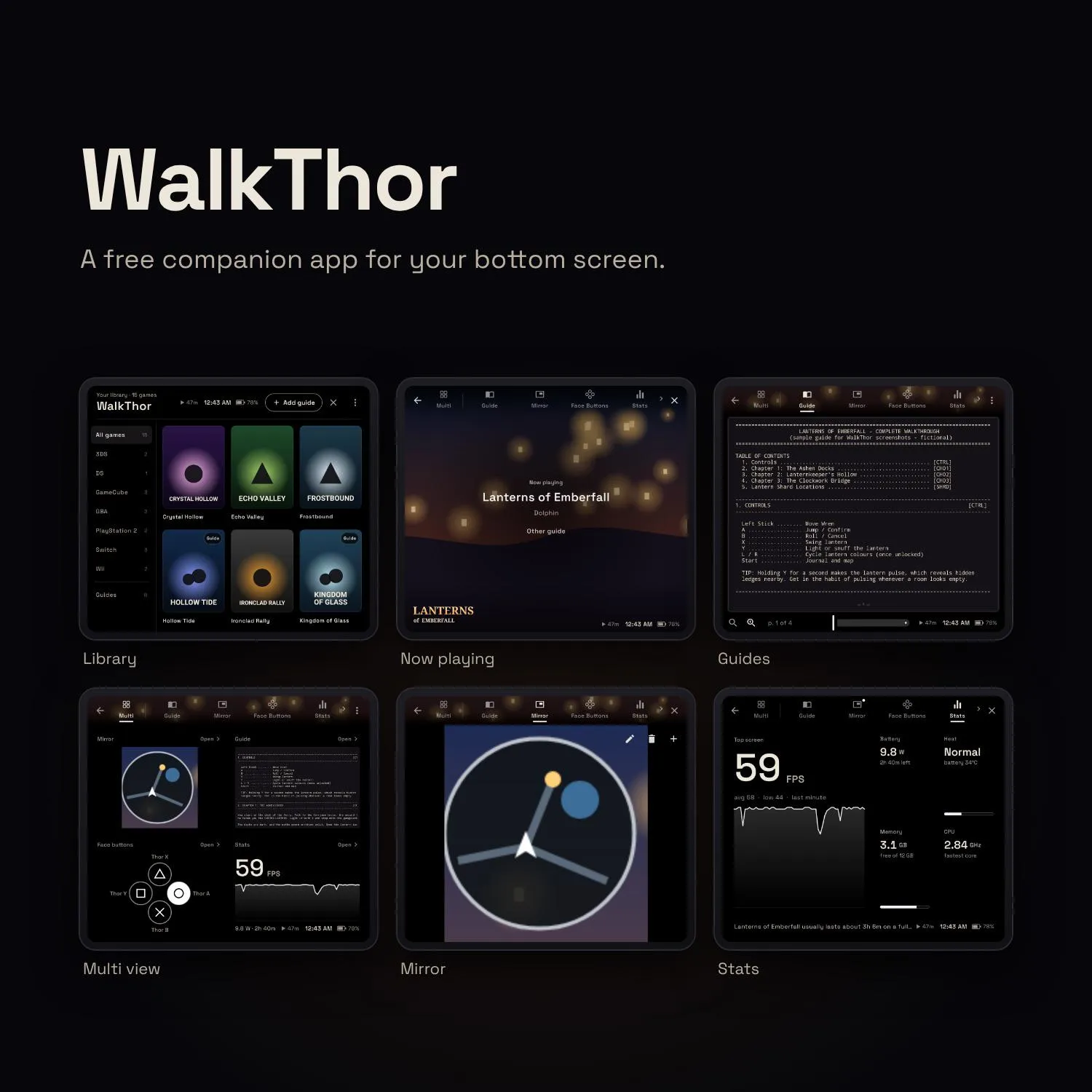
WalkThor is a free, open-source Android companion app for the AYN Thor's bottom screen. Start a game in Cocoon or ES-DE and the bottom screen becomes that game's companion: its guide, a live mirror of part of the top screen (like a minimap), its face buttons the way the game labels them, and a live FPS and battery monitor, all one tab away, while the game keeps full speed on the top screen. It can also screenshot the top screen and show what's said in your game as live captions on the bottom screen.
WalkThor works alongside Cocoon by reading a log file Cocoon writes, and alongside ES-DE by reading its es_log.txt. It is an independent, unofficial project, not affiliated with or endorsed by Cocoon, ES-DE, AYN, ScreenScraper or SteamGridDB. It doesn't include any games, ROMs or guides; you add your own, and guides belong to their authors. It only goes online if you add a scraper account to fetch artwork or to download the captions model; everything else stays on your device. It uses accessibility access only to open with a swipe, hand your game its performance back, and see which app is in front; it never reads your screen or what you type. Captions need Android's "record audio" permission, which Android requires for capturing another app's sound; the microphone is never used.
Features
- Now playing — start a game in Cocoon or ES-DE and the bottom screen shows the game's hero art and logo, the emulator, and tabs across the top: Multi, Guide, Mirror, Face Buttons, Stats and Apps. Switching tabs keeps your place in each, and Back takes you to Now playing.
- Your library — with a ROMs folder linked, the library shows your games as covers, sorted by system folder. Windows games work from .pcgame, .steam and .steamappid files. Games with a guide are tagged; long-press a game to choose its cover, its background on Now playing and its marquee, or hide it.
- Guides that open themselves — add a PDF or TXT walkthrough and WalkThor opens it to the game you just launched, right where you left off. Search the whole guide, zoom in, and read single page or two-page spread.
- Multi view — up to four panels on screen at once: any mix of guide, Mirror, face buttons, stats and your apps. Tap a panel to open that tab; press and hold a panel and drag it to rearrange them.
- Shots — screenshot the whole top screen, or just the part you frame (a map or a puzzle), without leaving your game. Screenshots are saved to your gallery.
- Captions — shows what's said in your game as text on the bottom screen, so you can play with the sound all the way down. It captures the game's own sound (never the microphone) and recognises speech on the device; after a one-time 40 MB model download it works offline.
- Mirror — show part of the top screen, like a minimap or HUD, live on the bottom screen. Pick up to four areas per game, switch between them or see them all side by side, and WalkThor remembers them.
- Face Buttons — the four face buttons labelled the way the game's own system labels them (shapes, or letters with A at the bottom or on the right), picked automatically from the emulator, each where its Thor button sits and lighting up as you press it.
- Stats — live FPS with a one-minute graph, power draw and time left, heat, memory and CPU speed. It learns how much power each game uses and tells you how long that game usually lasts on a full charge.
- Apps — open any app on the bottom screen while your game keeps running up top. Pin the ones you use most; press and hold an app to open it on the top screen instead.
- Artwork scraping — add a ScreenScraper account and/or a SteamGridDB API key and WalkThor scrapes box art for your guides' covers, and a screenshot and marquee for each game.
- Works with your own artwork folders — Cocoon's media folder or ES-DE's downloaded_media, plus optional scraping, all in one settings screen.
- Keeps your game at full speed — while a game runs, WalkThor never takes Android's top-app priority from it, and after WalkThor opens it hands priority back with one tap on the top edge of the game's screen.
- Comes back if a heavy game pushes it out — if Android closes WalkThor while a demanding game loads, it reopens on the bottom screen right away and hands the game its priority back.
- Animated book — pages turn in 3D around the spine; single page or two-page spread, with adjustable text size. PDFs default to a two-page spread; TXT guides to a single wide page sized to 80 columns so GameFAQs-style ASCII tables stay aligned.
- Reading lens and magnifier — zoom a page to full width up to 500% with − / +, pinch or double-tap, or press and hold on a page for a magnifier loupe.
- Search — results as you type, a list of every matching page with snippets, ▲/▼ to step through matches, and highlights on the page (PDFs included).
- Swipe down to open — swipe from the top edge of the bottom screen to bring WalkThor up or put it away.
- OLED-friendly — true black, auto-dim after the time you choose to the darkness you choose, and a status bar with the time, battery and how long you've been playing.
- Controller support — L1/R1 (or D-pad left/right) turn pages, in the book and in the lens.
- Remembers your place in every guide, with a page scrubber for big jumps.
Setup guide
Download app-release.apk from the latest release and sideload it (allow "Install unknown apps" for your browser or file manager). To get updates automatically, add the repository to Obtainium, which installs straight from GitHub releases.
- Install the APK from the latest release.
- Add a guide: Add guide in your library, or Open with / Share a PDF or TXT from a file manager.
- Link Cocoon's folder (the one with
launch_debug.log) so WalkThor knows which game you started. - In Cocoon, choose WalkThor as the companion app for the bottom screen.
- Allow accessibility access when WalkThor asks. It's what keeps the game at full priority (and lets you swipe WalkThor up and down).
- For Captions, allow the "record audio" permission when asked. Android requires it for capturing another app's sound; the microphone is never used.
Using ES-DE instead: in ES-DE, turn on Custom Event Scripts and Debug Mode (Main menu > Other settings) and restart it, then link the ES-DE folder in WalkThor under Settings > ES-DE.
Optional: link your artwork folder (Cocoon's media folder or ES-DE's downloaded_media) for game art, logos and guide covers. Every step is also in the app under Settings (⋮) → About → How to set up WalkThor, with a tick for each step that's done.
Known issues
- Scanned PDFs without a text layer display fine but can't be searched (no OCR).
- Password-protected PDFs aren't supported.
- Matches that span a page break in TXT guides aren't found.