AI-generated page. This page was automatically generated from a source and a project page and may contain inaccuracies or outdated information. Please verify details with the original source.
ZomboidDS
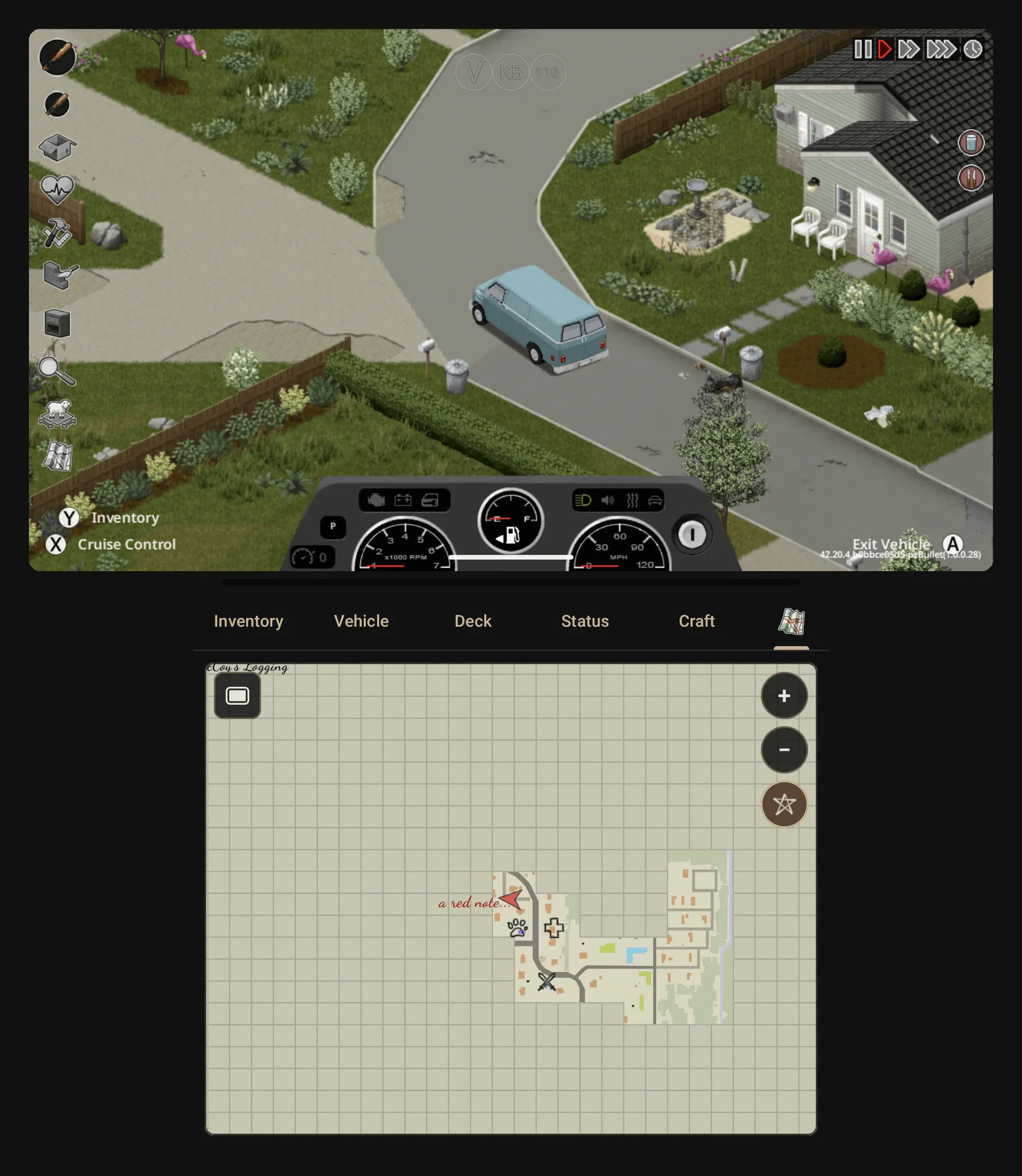
Dual-screen companion app for Project Zomboid (Build 42) via Zomdroid: the game on the top screen, inventory, crafting, status, map and vehicle controls on the Thor's bottom screen.
Description
ZomboidDS is a Nintendo DS-style dual-screen setup for Project Zomboid on handhelds like the AYN Thor. The game runs on the top screen through Zomdroid, while the ZomboidDS Companion app runs on the bottom screen and renders everything in the game's own art — icons are read from the player's own installation on the device, no game files are shipped.
The bottom screen has these panels:
- Map — the game's minimap on the bottom screen. It follows you (or your car), only shows what you've explored, and can show your own map symbols and notes. It sits next to the Here tab or on its own tab, and only shows on saves that allow the minimap unless you tick "Map on every save" in the mod options.
- Inventory — your bags and every container around you, with the game's icons; move items with a tap or by dragging, and use them through the game's own item menu (read, eat, apply, craft, ...). A new side-by-side layout, plus multi-select: hold an item for half a second or draw a box over several, then move them all at once.
- Here — its own tab with what you can do where you stand, one card per object (fridge, sink, door, ...). In a car it turns into the vehicle view with the car's own menu as big buttons.
- Deck — the game's speed buttons, the time and your alarm, plus commands you pick yourself (zoom, search mode, flashlight, map, sit, shout, drop bag, ...). Weapons shows your hotbar, so you can switch weapons with one tap.
- Status — the game's moodles, your body with its injuries, and the game's treatments.
- Craft — the recipes you can make with what's in reach, what each needs, and crafting them.
- Vehicle — while you drive, speed, engine and fuel with the car's controls.
An item's main uses (eat, drink, wear, read, bandage, reload, ...) are buttons now, taken from the game's own menu.
Because everything is driven by the game's own data, most mods should stay compatible. The mod's bridge listens only on 127.0.0.1 (loopback), so nothing on the network can reach it; the app has no analytics and no accounts. On the Thor, the companion app launches on the bottom screen (display 4).
ZomboidDS is an unofficial mod, not affiliated with or endorsed by The Indie Stone. It requires your own copy of Project Zomboid (Build 42) running in Zomdroid — no game data is included. It builds on ZombieBuddy (MIT) as the Java mod loader. Licensed under GPLv3.
Setup guide
- Install Zomdroid and set up your own copy of Project Zomboid (Build 42) in it.
- Download
ZomboidDS-<version>.apkfrom the latest release and install it. - Follow the in-app setup checklist: it installs the mod for you (through Android's folder picker, no storage permission needed), downloads ZombieBuddy from its GitHub releases (a pinned version verified against built-in SHA-256 hashes), and checks the prerequisites. The app updates itself from the setup screen and shows what's new after an update.
- Launch the game in Zomdroid on the top screen and the companion app on the bottom screen.
A detailed user guide is included in the repository.